

Facebook advertising is one of the fastest-growing and most popular forms of online marketing. It’s a great way to reach your target audience on a platform they’re already using.
Why Should Accountants Use Facebook Ads?
Facebook ads can be very effective for reaching new clients looking for an accountant or financial planner in their area. The platform allows you to target potential clients based on their interests and location so that they see your ads when actively searching for accountants locally or online.
This post will cover how to set up and run Facebook advertising for accountants.
Sign up for Facebook Ads Manager
To start using Facebook Ads Manager, you’ll need a Business Page. This is because personal profiles can’t run ads.
Then, follow these steps:
- Open Facebook Ad Manager
- Click the ‘Go to Ads Manager’ button.
- Verify the information you entered on the ad account setup page.
- Set up your payment method.
- Save changes.
Once you have created an Ads Manager account, you can make and manage your Facebook ads.
After logging into the Ads Manager, you’ll see a dashboard listing of all your campaigns, ad, sets, and ads. This includes ad performance on your Facebook page.
To create a new campaign or ad through the Facebook Ad Manager, click on the green “Create” button on the left side.

Select Your Objectives for the Facebook Ad Campaign
Facebook’s Ads Manager is designed to help you reach your campaign goals. Before creating a new ad, the platform will prompt users with 11 different objectives.
When you choose your objective, for instance, advertising for accountants, Facebook will display the ad option that best meets this goal.
Select Your Target Audience
You need to run a few ad sets to get started with Facebook advertising, starting with your target audience. You can do this for each ad that belongs to the same campaign. If you’re initiating paid advertising on Facebook, you’ll likely have to experiment with different targeting options until you reach the target audience.
Facebook’s audience definition gauge helps you narrow your focus by considering all of the selected target options to come up with a potential reach number.
When you’re unsure whether to target a specific or general public, ask yourself what your objective is. If your goal is to generate traffic—for example, as an accountant who needs business clients—focus on the kind of people likely to be interested in what you offer.
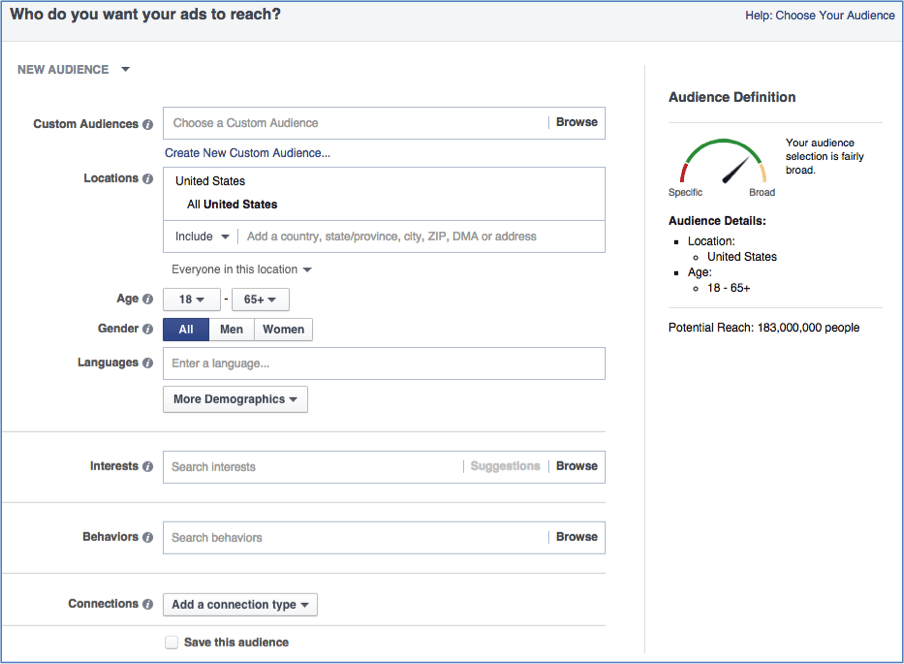
Facebook enables advertisers to target audiences based on user-specified demographics and interests associated with pages and other users’ accounts.
- Location
- Age
- Gender
- Languages
- Relationship
- Education
- Work
- Financial
- Home
- Ethnic Affinity
- Generation
- Parents
- Politics (U.S. only)
- Life Events
- Interests
- Behaviors
- Connections
Set Your Budget
On Facebook, you can set either a daily or lifetime budget. Here’s how they differ:
- Daily budget
A daily budget means that Facebook will track your spending per day. Remember that you’ll need to spend at least $1.00 per day on ads, and your click-through rate must be twice the amount you are willing to pay per click.
- Lifetime budget
Select the lifetime budget if you want to run your ad for a specified time. This means Facebook will pace the spending over that period by spreading it across days in ways similar to what is done with the daily budget.
Facebook Ads Cost
Facebook Ads Cost is crucial to consider when planning your ad campaign. The cost per click (CPC) and cost per impression (CPM) are the two main factors affecting your ad’s overall cost. The CPC is how much you pay every time users to click on the ad. The CPM is how much you pay for every 1,000 times users on Facebook see the ad.
| Average Facebook Advertising Cost | Bidding Model |
|---|---|
| $0.97 | CPC: cost-per-click |
| $7.19 | CPM: cost-per-thousand-impressions |
| $1.07 | CPL: cost-per-like |
| $5.47 | CPA: cost-per-download |
Schedule
You can set your campaign up so it starts running immediately or customize the start and end dates, also set parameters to make your ads only run during specific hours and weekdays.
Optimization & Pricing
Decide whether to bid for clicks or impressions, and your ad will be displayed based on the price you set. If you choose not to let Facebook set your bids, manual bidding gives you full control over how much money is spent per completed action.

Generate Your Ad
What do you want your ad to look like? It should be tailored to reflect the original objective that prompted it.
This ad format features two options for displaying ads: Links and Carousels. With this option, you can either display a single image at no additional cost or a multi-image ad with three to five scrolling images—at no extra charge!

Track Your Performance
Check your performance regularly, even after a day or two of running their campaigns.
The “Ad Reporting” screen in the Facebook Ads Manager contains information such as how many times your ad was clicked and how much each click cost.
If your ad is performing well, continue to run it. If not, try a different post for your next campaign.
Now you know how to set up Facebook advertising for accountants.
We hope you learned how to start setting up the accountant ads for your business. Still, if you prefer someone else to take care of them, you can always check out the Facebook Services From Alameda Marketing below or drop us a message in the contact Form.
Looking forward to hearing from you!